Menghapus File yg tidak bisa di hapus dengann ..

Kill Box ?
Adalah tool yang digunakan untuk menghapus file yang masih digunakan yang tidak bisa dihapus. Jika file masih digunakan atau masih berjalan, kill box akan berusaha untuk mengakhiri prosesnya (menutup file yang sedang berjalan) dan menghapusnya. Untuk file yang lebih sulit dihapus, seperti file yang me-load .dll atau services, delete pada saat reboot akan menggunakan fungsi windows untuk menghapus atau menggantikan file yang masih digunakan.

Cara menggunakan kill box :
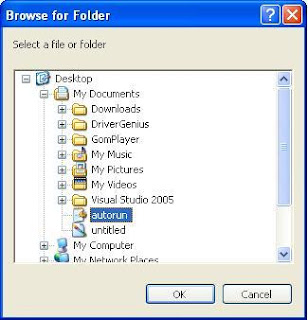
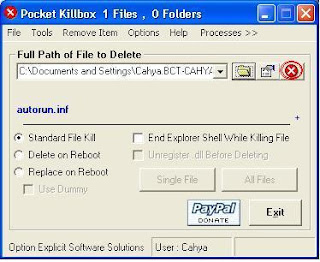
1. Jalankan Kill Box. Klik browse file, logo folder terbuka,


2. Pilih file yang akan dihapus, OK.


3. Klik tanda silang merah untuk menghapus. Selesai, file akan terhapus.
Untuk file yang lebih sulit dihapus, seperti file yang me-load .dll atau services, pilih delete on Reboot.


Download Kill BOX

Kamus Bahasa Jepang ..

mau ngeshare gan kamus bahasa jepang dari saya bahasanya hiragana sama katakana tapi sayangnya penulisanya bukan pake huruf hiragana atau katakana melainkan make romaji atau tulisan latin.


password nya =  taikuda ..


doenlod ^_^


 Permisii ...

Software Penggabung Gambar dan File Lainnya ..

HIDE ME MASTER V2.0

Program buatan saya pribadi yang berfungsi untuk menggabungkan berbagai file menjadi satu file, misal:
Kita ingin menggabungkan file gambar A dengan file video B, gambar C dan Lagu D, lalu kita gabungkan ke-3 file tersebut sehingga menjadi 1 file 'Gambar A' saja yang muncul.
Untuk mengembalikan ke-3 file tersebut cukup masukan file 'Gambar A' tsb ke program ini dibagian "PEMISAH"

Apa keuntungannya? misal kita ingin share file video ke teman kita tapi kita hanya dibolehkan share file dokumen maka solusinya adalah masukan file dokumen sebagai file master dan file video kita jadikan file attachment (sisipan) lalu kita kirim ke teman kita tsb tentunya teman kita punya program ini juga untuk memisahkan file yg kita gabungkan tadi.

CARA PAKAI:
PENGGABUNGAN
1. Masukan file master "misal:Gambar Kaskus.jpg"
2. Masukan file yang akan disisipkan di file to hide "misal:Video 3gp Kaskus.3gp"
3. Tekan tombol "Hide Me"

maka file hasil tercipta di folder yang sama dengan software ini dengan format "hide-", nah file hasil hanya berupa "Gambar Kaskus.jpg" padahal didalemnya ada video 3gp Kaskus.3gp

PEMISAHAN
1. Masukan file hasil penggabungan di file master
2. Tekan tombol "Show me" ..


PROGRAM TELAH DISEMPURNAKAN SUPPORT FILE BESAR
TESTED +-600MB hanya 1menit untuk hide/show

Download :

Versi 01 .
Versi 02 .


  oKe Thank's

cara menShutdown komputer lain tanpa shoftware ..

Cara Menshutdown Komputer Orang Lain Tanpa Software ...!!

Nih teman, kalau kita kesel sama net tempat anda bermain. Jangan keseringan, tips ini iseng saja. Kalo kamu merasa BeTe atau bosan sama pelayanan warnet di tempat kamu, padahal udah bayar mahal-mahal buat internetan di tempat tersebut dan di tambah lagi pas enak-enakan internetan, tiba-tiba disconnected...ach damn it!!!
Khavid.com mau kasih solusi buat ngejawab rasa keusilan kamu semua yang emang usil banget.

Mau tau caranya??read it...!!!

Kejam nii ..
Okay, disini kamu tidak butuh software apapun dalam hal ini. Yang kamu butuhkan hanyalah sebuah otak yang usil dan buat have fun saja.

Caranya:
1. Pada komputer, klik Start -> Run, di kotak isian tersebut kamu isikan "cmd" (tanpa tanda petik )

2. Setelah itu muncul kotak berwarna hitam, di situ kamu ketikan SHUTDOWN.EXE (spasi) -i (spasi) -m

3. Contoh: Shutdown.exe -i -m lalu kamu tekan Enter

4. Maka akan muncul kotak di samping yang bernama "Remote Shutdown Dialog"

5. Kamu klik "ADD" -> untuk menambahkan IP target or nama target di LAN, atau kamu klik "Browse" untuk mencari otomatis

6. Kamu bisa tentuin yang enaknya buat ngusilin komputer orang itu, apakah di shutdown, restart, or Log off.

7. Tentukan time yang pas buat deat time-nya komputer itu beraksi

8. Kamu bisa tambakan other (planned), ini dimaksudkan agar si user lawan mengira kalo ini ulah server yang lagi maintenance

9. Kirim kan pesan kematian mu ke komputer orang di COMMENT Contoh :
Contoh:
Minggir Lo ! Gua Pengen Main Di Situ ! kwkwkwkwkwkwkwkwkwkwkwkwkwkw

10. Tertawalah yang puas melihat orang lain kebingungan..hahahahahahahahaha


Pesan dari saya:

1. Ini sifatnya buat usil, kalo nanti kamu di usilin juga jangan marah yah...

2.Ini paling penting kamu inget...sebab dalam hal ini, IP kamu or nama kamu bakal terlihat di comment kematian kamu...karena dari sana terdapat IP addres kamu

3. Ini buat have fun saja, jangan di pake sering-sering yah, kasihan tuh warnetnya ga dapet duit gara-gara kerjaan keusilan kamu

Inget....!!!
-> firewall harus dimatikan,jika tidak, cara ini gak akan berhasil.

Selamat Mencoba..

[SHARE] Folder Guard 8.3!!

Program ini punya fitur yang gak kalah ama PC Security dan yang pasti dah support windows 7 ..
mantapp ..

How To Install

  1. klik instaler folder guardnya
  2. klik next
  3. klik next terus ampe instal selesai dan jangan lupa uncheck launch folder guard dolo baru klik next lagi,,
  4. Masukin licensed registrynya gan  
  5. Klik yes
  6. Nanti keluar notifikasi sukses masukin registry licensednya
  7. Folder guard agan udah full version ..
Sekarang gak perlu pake patch lagi gan (karena pada beberapa kasus minta validating) ane udah update Folder Guardnynya sekarang pake registry licensed jadi agan tinggal klik file registrinya aja dan beres gak akan muncul notifikasi validating lagi .. ^_^

 monggo download

   - Oiya saya lupa kegunaan nya :


  1. bisa untuk mengunci folder
  2. bisa untuk mengunci Drive juga
  3. menghidden files ..
  4. Menghidden Drive ..
  5. Dan lain lain..
  6. masih banyak kok ..
Sekian Dulu ya ..~

Cheat Engine 6.0


- About This -

Cheat Engine

Download Cheat Engine

January 10 2011:Cheat Engine 6.0 Released:

It has taken a while but the wait has been worth it: Cheat engine 6.0 has been released
It's not only a new version with some new features, but a complete port from Delphi to Freepascal/Lazarus with support for 64-bit
Of course, some features could not get implemented in this new version just yet, like the directx mess and trainer creator, but they are planned to come back in the next versions. If you need to use them, just use Cheat Engine 5.6.1 instead(Check the download page if you need it). And other features have just been stripped because they where useless (hyperscan)
Of course, new stuff has been added like the VEHDebugger, improved pointerscan speed, ability to compare to the values of a saved scan, advanced scripting, etc...etc...etc...

If you encounter bugs or have suggestions, please do not hesitate to report them. If you don't I can't fix/improve Cheat Engine


Cheat Engine 6.0

Fixes:
# several disassembler fixes
# change by offset supports negative hexadecimal offsets
# several fixes to the data dissector
# Fixed simple paste
# Hextype won't change pos
# Bugfixes after the official release (Max 1 week):
# January 11 2011: Fixed a hotkey issue
# January 11 2011: Fixed the stringlist_add crash
# January 13 2011: Fixed a deadlock in the lua createProcess command
# January 15 2011: Fixed the lua writeXXX commands
# January 16 2011: Fixed assembling st(0),st(x) instructions and one more hotkey issue


Changes:
# Added a 64-bit version
# Different compiler (uses fpc/lazarus now instead of delphi)
# Addresslist has been reimplemented from scratch
# Debugger has been reimplemented from scratch
# Hexview has been redesigned
# Added a new debuggerinterface : VEHDebugger
# replaced underc with lua
# Added several lua routines
# pointerscanner speed increased
# custom types changes from scantype to valuetypes that can be used in multiple locations
# disassembler shows colors and can be configured
# improvements to the stackview
# added tabbed scans
# standalone Trainermaker is currently not implemented
# added the option to save scanresults
# You can now compare the current addresslist to the values of a saved scan (first scan included)
# The above also makes the percentage scans more useful, so a between % scan has been added as well
# Tables can now contain lua scripts that can get executed
# Table entries can execute lua scripts when enabled/disabled (see it as an extension to auto assembler)
# Added conditional breakpoint
# added break on data breakpoint
# automated "find what accesses address" now shows a trigger count
# Hotkeys on cheat entries have been improved
# Temp files don't get saved in the ce folder anymore
# Cheat Tables don't get saved in the ce folder anymore
# Added a suggestion where you can save your tables now
# Cheat table entries can now be dragged and dropped, including on top of eachother
# Hexview can now show seperators any way you like
# You can compare two hexviews with eachother to show the differences
# Added the 7 byte hexadecimal display type
# Added some extra plugin apis
# Improved the change register on breakpoint gui
# And lots of other stuff...


Also, I heard news that scientists have finally managed to create pigs with wings

January 5 2011:Shortcut to launch Cheat Engine missing:

In case you're noticing that when you start Cheat Engine you get a message that the shortcut isn't valid anymore and Cheat Engine.exe has been deleted from your system then you've become the victim of a really crappy anti virus program. (Really, any anti virus that deletes files without user permission is crap)
This is probably also the cause for the "Error Code 2" message during install

The solution to this problem is uninstall your anti virus(McAfee in particular) and reboot. Then reinstall Cheat Engine and everything should work fine(perhaps installing a different anti virus as well, as long as it isn't McAfee)

And if you feel like it please contact that anti virus vendor (e-mail and/or forum) and let them know they should stop deleting Cheat Engine.exe (Even if their forum already has more than 100 topics about it)

also, Cheat engine 6.0 will be out any day now
 ____________________________________________________________

Sedoott shoftware nya  ...

Thank's ..
Mengubah Flash Disk Dari 1GB ke 2GB


pertama tama download lah program nya di sini .. :)
Setelah didownload, silahkan tancap flash disk 1GB Anda ke USB computer/laptop Anda..''
Saat ini ukuran flash disk sudah bervariasi mulai dari ukuran terkecil yaitu 1GB hingga 8GB yang terbesar saat ini. Untuk ukuran terkecil yaitu 1GB saat ini mungkin sudah jarang tersedia di pasaran karena memang karena kapasitasnya yang kecil juga dari segi harga tidak terlalu jauh berbeda dengan yang ukurannya lebih besar sehingga orang lebih cenderung memilih yang berukuran besar sekalian seperti yang berukuran 4GB.namun jika Anda masih memiliki flash disk yang berukuran 1 GB jangan keburu dibuang terlebih dahulu saat ingin berganti flash disk dengan ukuran yang lebih besar karena disini akan saya tunjukkan bagaimana mengubah flash disk berkapasitas 1 GB diubah menjadi berukuran 2 GB dengan mudah. Bahkan oleh yang awam sekalipun mengenai teknologi flash disk ! ~

software yang Anda download tadi.
Setelah terbuka, pilih drive flash disk Anda kemudian klik tombol “Fix”.
Setelah itu silahkan cabut flash disk dan tancapkan kembali ke PC Anda dan lihat kapasitas barunya.
Dengan cara ini, saya berhasil mengubah kapasitas flash disk 1GB saya menjadi 2GB ..
 

Membersihkan irus shortcut

berhubung dengan maraknya virus shortcut yg beredar..
ane sebagai nubi mencoba ingin berbagi bagaimana cara membersihkan virus ini..

copy source dibawah ini ke notepad lalu simpan dengan extension .bat
contoh:"a.bat"
setelah itu jalankan file "a.bat"
insya allah flashdisk anda akan kembali seperti semula


@echo off


D:
Attrib -r -s -h /s /d

erase *.lnk
erase *.tmp
erase voeuw.exe
erase voeuw.scr
erase x.exe
erase xxx.dll
erase autorun.inf

E:
Attrib -r -s -h /s /d

erase voeuw.exe
erase voeuw.scr
erase x.exe
erase xxx.dll
erase *.lnk
erase *.tmp
erase autorun.inf

F:
Attrib -r -s -h /s /d

erase voeuw.exe
erase voeuw.scr
erase x.exe
erase xxx.dll
erase *.lnk
erase *.tmp
erase autorun.inf


G:
Attrib -r -s -h /s /d


erase voeuw.exe
erase voeuw.scr
erase x.exe
erase xxx.dll
erase *.lnk
erase *.tmp
erase autorun.inf


H:
Attrib -r -s -h /s /d


erase voeuw.exe
erase voeuw.scr
erase x.exe
erase xxx.dll
erase *.lnk
erase *.tmp
erase autorun.inf


I:
Attrib -r -s -h /s /d

erase voeuw.exe
erase voeuw.scr
erase x.exe
erase xxx.dll
erase *.lnk
erase *.tmp
erase autorun.inf


J:
Attrib -r -s -h /s /d
erase voeuw.exe
erase voeuw.scr
erase x.exe
erase xxx.dll
erase *.lnk
erase *.tmp
erase autorun.inf

goto :eof
________________

ok sekian dulu ya ..

Yugioh Power oF Kaskus ( ONLINE )

Download Link : Yugioh Power oF kaskus

How to Install :

  1. Download Part 1, 2 dan 3 boleh dari IDWS, MF (download juga update-nya sekalian kalau ada)
  2. Ekstrak ke tempat yg diinginkan, contoh: C:\Games\Power of Chaos KASKUS
  3. Buka Folder Power of Chaos KASKUS. ada data.rar dan main.rar ekstrak keduanya di folder itu.
  4. Untuk pengguna Windows Vista & 7 mungkin perlu klik kanan Run As Administrator dan sebaiknya matikan UAC terlebih dahulu
  5. Jalankan unlock.exe klik Import.reg akan ada pemberitahuan bahwa informasi sudah dimasukkan        dalam register..
 6.Buat shortcut di desktop, Klik kanan pada joey_pc.exe -> Send To Desktop (Create Shortcut) ..
 7.Buka properties shortcutnya, pada kolom Target tambahkan pada baris terakhir -speedy -win

 8. Untuk pengguna Windows 7 dan Vista tambahkan pula -32
 9 .Game sudah siap dimainkan 

  How To Online -
  1. Pilih Duel Mode
  2. Pilih Versus
  3. Pilih Use current deck, untuk memakai deck yang sudah ada
  4. Masukkan username, pilih host untuk membuat permainan baru
  5. Pilih guest untuk bergabung dengan duelist lain ..
 Sekian dulu yaa .. 


Blogger news


ShoutMix chat widget

About

THE WORLD OF COMPUTER © 2012 | Template By @rifqisulthan